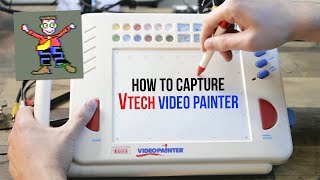
VTech VideoPainter - How to Capture Artwork (Tutorial)
Channel: Aaron Rutten
Category: Howto & Style
Tags: vtech video painter 1991vtech toysv-tech videopainterhow to capture component videodigital artistretrotinkhow to print vtech videopainterdigital arttutorialsdigital illustrationvideo paintervtech video painterelgato cam linkhow to capture vtech videopainterretro-tink
Description: I'll demonstrate how to capture an image or video from the VTech VideoPainter using a Component Video Cable, HDMI Capture, and the Retro-Tink which converts Component Video to HDMI. You'll also need capture software such as Elgato Gamecaster, OBS Studio or XSplit. You also need an HDMI cable that is regular HDMI on one end and "Mini HMDI" on the other. I showed "Micro" in the video, but it's actually "Mini HDMI". There are adapters for this as well. Elgato Cam Link: elgato.com/en/cam-link-4k Retro-TINK: retrotink.com/product-page/2x-mini XSplit: xsplit.com ⭐ Become a Member of my YouTube Channel: aaronrutten.com/join ✔️ SUBSCRIBE to my channel for new #DigitalArtSmart videos: aaronrutten.link/subscribe ✔️ Browse my Art Tutorial Library: aaronrutten.link/tutorials ✔️ Check out all of my online digital art courses: aaronrutten.link/courses ✔️ My Website: aaronrutten.com DISCLAIMERS: I earn revenue from affiliate links. All opinions presented are my own. In the event I am paid to promote a product, I will say so in the video or description. #DigitalArt #VTechVideoPainter


